Friday, October 13, 2023

Godot 3.5 AI

Since one of the "near" future steps for the ice puck game I had to see how to implement the NPC AI, and I want to leave a few documentation/guide videos. All with explanations and examples, plus a description of mine here so you can remember at a glance. [Remember you can use any of them if it fits you, I'm only giving hints]

State machine
https://youtu.be/RzUkBT7QwrU?si=OirslGHuHIs2kIDk
These are your usual platformer ones, mario like, where the enemy has a pattern that repeats over and over, no matter what.

Behaviour tree
https://youtu.be/YHUQY2Kea9U?si=oxl2viKZpWvxe0mG
These are more seen in fighting and shooter games, I believe racing games could go here as well. The enemy has a tree and different paths with minimum weights, to select the most efficient to their task. Your enemy doesn't take into account your life or score, it wants to finish you. 

GOAP
https://youtu.be/LhnlNKWh7oc?si=ct5vAyN4yCuv3nf_
The Goal Oriented Action Planning (GOAP),
which is the one I'm probably going to use. This one uses the priorities given for their goals, hence why for a sport game could be pretty useful. For example, the enemy takes into account if it has more or less goals than you, to decide if defence the net or attack.


Wednesday, October 11, 2023

3D objects position

 So... Another Godot for the PS Vita entry here.

There are a few ways to check if the puck enters the net, and for the NPC to follow the puck, I need to know its position. Therefor I had to see how to manage it in Godot 3.5, and that's what I want to write here for the people who want to do the same.

WARNING: This is the way I came up with. There could be more, and it may be different in other Godot versions, but for me, it works. Besides, this can be reused in any other project easily. Last but not least, the code and Idea below shows values in screen to give you an idea of how to use it, the numbers are by no means used in practice yet (I save that for another entry, maybe).

Without further ado, Code to see the positions of 3d objects in Godot 3.5

First, I took the "3D Squash the Creeps starter project" from https://github.com/gdquest-demos/godot-3-getting-started-2021/releases/tag/1.0.0 to have a test base (this way I don't have to create a new scene, and anyone can follow along without much problem). I cleaned a bit tho, no need of the mobs group or the scoring system for my test.


Then, I created and used signals to send the numbers from the Player and the creeper(Mob) to a UserInterface/Label node(ScoreLabel), so they can be printed in screen.  My added code is below:

```
# Creeper Code

signal creep
func _process(delta):
    var cPosition = get_global_transform()
    emit_signal("creep", str(cPosition))
```

```
# Player Code

signal player
func _process(delta):
    var pPosition = get_global_transform()
    emit_signal("player", str(pPosition))
```

Once I had the numbers, I just created two local variables on the label and printed them on screen.
```
# textPositions label code

extends Label

var player_position = 0
var creep_position = 0


func _on_Mob_creep(cPosition):
    creep_position =  cPosition

func _on_Player_player(pPosition):
    player_position =  pPosition

func _process(delta):
#    text = "PlayerPos: %s " % player_position
#    text = "CreeperPos: %s " % creep_position
    text = "PlayerPos: %s \n" %player_position + "CreeperPos: %s" %creep_position
```
 
Here you can see images of the result with the player in various positions


More on the position and the get_global_transform() here: https://ask.godotengine.org/40558/follow-node-movement-but-ignore-rotation

Furthermore, if you want the net's position from the label node, you can use:
(In my case, the label was the grand-grandchild of the player's sibling, so a few parents were needed)

```
onready var netA = get_parent().get_parent().get_parent().get_node("GoalNet").get_global_transform().origin
```

Saturday, October 7, 2023

New Engine

I had a secret halted demo game for a long time (due to some nasty bugs), so when I found out about the new Homebrew contest for the vita I knew it was time to squash them and release it: https://fuhen.homebrew-contest.com/submissions/23/ 
 
Besides, thanks to the FuHEN Homebrew Contest for PS VITA, I discoverd some options that I didn't know. And since this blog is to develope homebrew for that console, I decided to add the info here. After reading around the resources page: https://fuhen.homebrew-contest.com/resources/ I discover a new interesting option for coding my Ice Puck homebrew, which is the Godot Engine: https://github.com/SonicMastr/godot-vita/releases/tag/3.5-rc5-vita1 
 
Official documentation for Godot 3.5 here:

Then, I tried to make a test exporting the game "3D Squash the Creeps starter project" (which also is a good introduction to the engine for beginners). A video explanation of how to code it can be found here: https://www.youtube.com/watch?v=YiE9tcoCfhE and the code's official repo is here: https://github.com/gdquest-demos/godot-3-getting-started-2021/releases/tag/1.0.0 
 

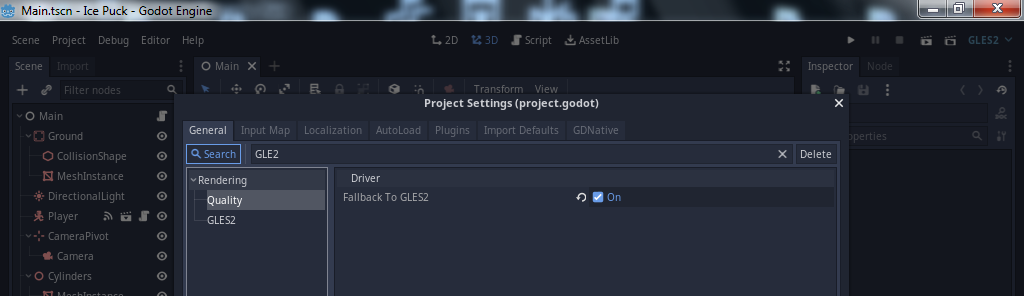
 As explained in the README, for it to work on the vita, we need to make a few adjustments to the project settings. 
(For newbies who don't find that config in the engine) I will explain those steps below, with screenshots: 
 
 Go to Project > "Project Settings..." 


Click on Search and type "GLE2" 
Then click Quality and mark the box "Fallback to GLE2" 


Next it's turn to: Click on Search and type "ETC2" 
Then click on VRAM compression and mark the box "Import ETC2"


After that, close the window. 
 
 
Finally to export your game: 
 
Go to Project > "Export..." 

When it asks for an export template, choose and load the "vita_template_3.5.rc5.tpz" file from the github.


Time to make and play your own games!

Sunday, October 1, 2023

Some hockey flowcharts

 These are some basic flowcharts to have an idea of what each of the key game objects does or doesn't and how.

The room should load the board and the rink first, and that's our first diagram.

Score Board and Timer

After the board come the players/skaters and the puck

Players / Skaters


The Puck


Extra notes: Game wise, the most work will be into how the players behave and how the puck react to them and the rink limits [This means that, in the future, the flowcharts may be updated]. Besides, there will be more charts for extra objects positions and updates, e.g. the nets or the rink limits. In addition, later on, we'll also have menu and options.


Friday, May 19, 2023

Modularity

A well-designed program must be modular if it has a big size, and guess what, these projects are big. So, for this entry, we will be making a modular base for our program. This means, we want at least 3 modules (files):

  • main program

----------------------------------------------------------

Friday, April 21, 2023

Some documentation

This entry provides papers and documentation on many key topics like:

   - Ice Hockey - Quick Guide
   - Game Programming Patterns
   - Scaling Screen
   - Simple DirectMedia Layer (audio, keyboard, mouse, joystick, and graphics hardware)
   - NPCs movement, a.k.a. AI and Steering Behaviors.
   - Multiplayer: Client-Server Game Architecture
   - Game pad controls reference
   - Writing your own Load / Save routines
   - How to choose a License

* The list should be updated along the project.

---------------------------------------------------------------------------------------

- Ice Hockey - Quick Guide
https://www.tutorialspoint.com/ice_hockey/ice_hockey_quick_guide.htm

- Game Programming Patterns, Robert Nystrom
https://gameprogrammingpatterns.com/

- Scaling Screen
https://gamemaker.io/en/tutorials/the-basics-of-scaling-the-game-camera

- Simple DirectMedia Layer (audio, keyboard, mouse, joystick, and graphics hardware)
https://wiki.libsdl.org/SDL2/FrontPage

- Create a Hockey Game AI Using Steering Behaviors: Game Mechanics
https://gamedevelopment.tutsplus.com/tutorials/create-a-hockey-game-ai-using-steering-behaviors-game-mechanics--cms-23026

- The Nature of Code, Daniel Shiffman
https://natureofcode.com/book/

- Client-Server Game Architecture, Gabriel Gambetta
https://www.gabrielgambetta.com/client-server-game-architecture.html

- Game pad controls reference, from EA's NHL games
https://help.ea.com/ca/help/nhl/nhl-16/nhl-16-controls/

- Writing your own Load / Save routines, Myopic Rhino
https://www.gamedev.net/tutorials/programming/general-and-gameplay-programming/writing-your-own-load-save-routines-r1289/

Wednesday, March 1, 2023

Back to the Basics

 After more than two years, I've come back here, with the original idea still as hot as the first day. However, the approach of this entry is to create a new generic sample, so it can be checked in any system quickly.

Doing this, we can have something (similar to an SDL hello world) to test, without any Vita or SDK requirement. Besides, we can use it as a base for everything else.


First, we'll need to create our main.c file
(check https://lazyfoo.net/tutorials/SDL/01_hello_SDL/index2.php for more info)

----------------------------------------------------------